
GuidesSee what the robot sees
See what the robot sees
Get the robot's camera frames as arrays, point the high-detail foveas, turn the head, and tune the streams.
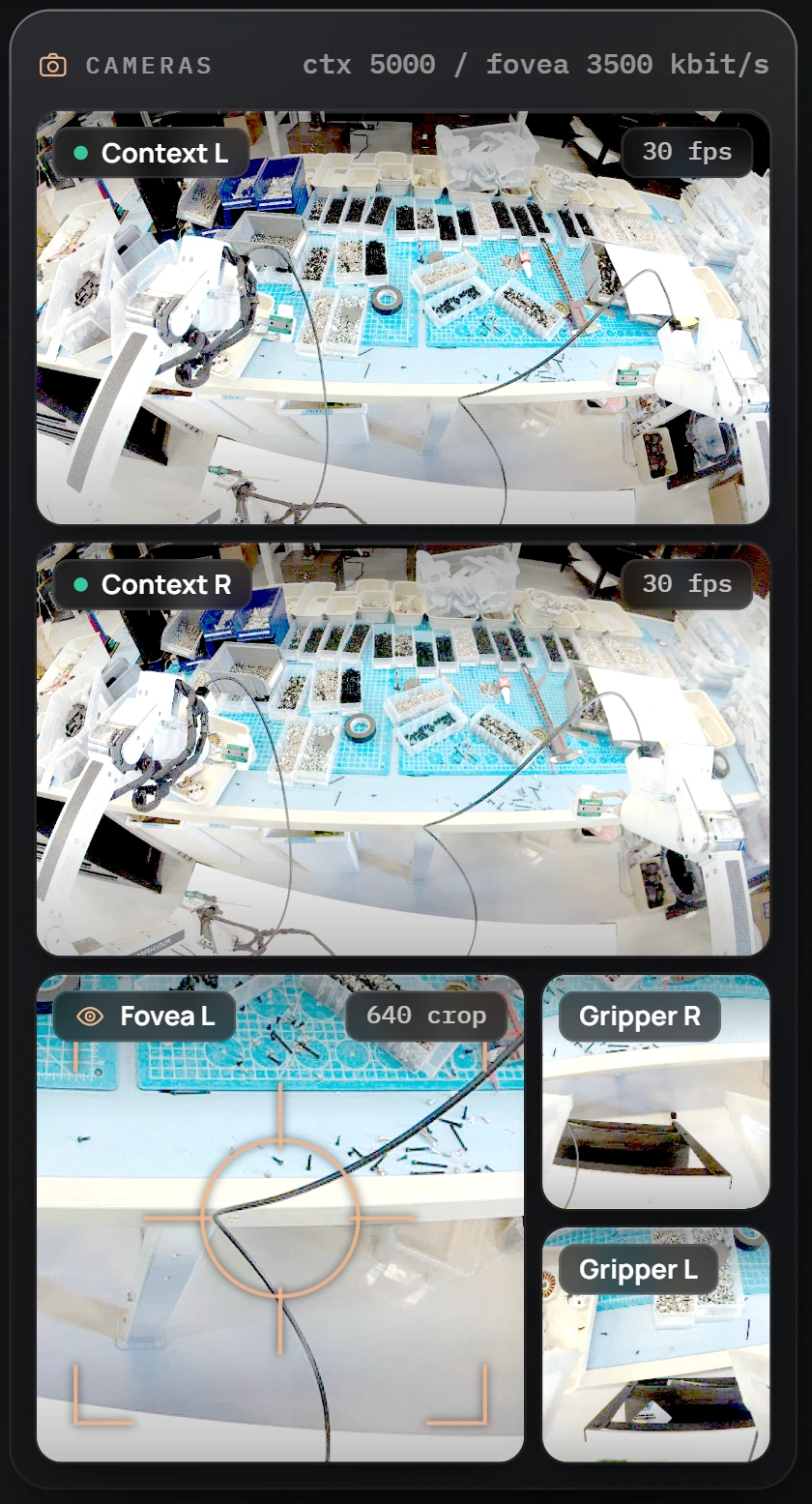
A robot with a head streams its cameras into every session. This guide shows how to get the frames as numpy arrays, how to point the foveas, and how to turn the head. It applies to robots in your fleet; an arm on your PC has no cameras.
Get the frames
frames = robot.sensors.get_camera_frames()      # {stream: HxWx3 RGB uint8}
sorted(frames)
# ['gripper_cam_left', 'gripper_cam_right', 'stereo_cam_left',
#  'stereo_cam_left_fovea', 'stereo_cam_right', 'stereo_cam_right_fovea']
frames["stereo_cam_left"].shape                 # (648, 1152, 3)
Each call returns the newest frame of every stream that has delivered one and drops the older ones, so a loop that reads frames is never behind.
| Stream | What it shows | Size |
|---|---|---|
stereo_cam_left, stereo_cam_right | the two wide context cameras in the head | 1152 x 648 |
stereo_cam_left_fovea, stereo_cam_right_fovea | a sharp crop of each context camera, wherever you point it | 640 x 640 |
gripper_cam_left, gripper_cam_right | a camera on each gripper | 224 x 224 |
The context and fovea streams of the head run at 56 frames per second per eye. The gripper cameras come from a second computer on the robot. If it is off, the session runs without them and everything else works as usual. robot.sensors.camera_names() lists the streams this robot offers.
The frames are decoded on your PC by the native core that comes with the kit. For a control-only session, skip the video altogether: Robot.connect("head-10", receive_cameras=False).
Show them
import matplotlib.pyplot as plt

frames = robot.sensors.get_camera_frames()
names = ["stereo_cam_left", "stereo_cam_right", "stereo_cam_left_fovea"]
fig, axes = plt.subplots(1, 3, figsize=(15, 4))
for ax, name in zip(axes, names):
    ax.imshow(frames[name]); ax.set_title(name); ax.axis("off")
plt.show()
Point the foveas
The foveas are how the robot sees detail without streaming full resolution all the time. The context streams show each camera's whole field of view at 1152 x 648. Each fovea is a window cut from the same camera at its full working resolution, 2304 x 1296 across that field, so wherever you point it you get twice the context's detail in each direction, about 18.6 pixels per degree. Together, a context stream and its fovea give you the detail of a 2304 x 1296 camera per eye, for a fraction of the bandwidth. Across both eyes, that is a combined 4608 x 1296, wider than a 4K frame. You choose where each fovea looks:
robot.control.set_gaze([0.5, 0.5, 0.5, 0.5])    # right x, y, then left x, y
robot.control.set_gaze([0.7, 0.4, 0.7, 0.4])    # both a little right and up
robot.sensors.get_gaze()                        # what you last asked for
Coordinates are fractions of the context image: x from 0 (left edge) to 1 (right edge), y from 0 (top) to 1 (bottom). Gaze is not motion, so it works while the robot is disarmed. The crop the robot actually applied comes back with every frame:
robot.sensors.get_camera_frame_metas() # per stream: applied crop, head poseIn the console, clicking in a context view does the same.
Turn the head
robot.sensors.get_head()                        # yaw in rad, 0 is straight ahead
robot.control.set_head(0.3)                     # positive turns to the robot's right
Turning the head is a motion command like any joint move, so the first set_head arms the session.
Tune the streams
robot.control.set_video_bitrates(context=5000, fovea=3500)     # kbit/s
robot.control.set_gaze_method("EyeTrackingCombined")           # 320 px foveas
robot.control.set_gaze_method("HeadsetOrientation")            # 640 px foveas
Bitrates change at once and the robot keeps them for later sessions. The fovea stays sharp at a much lower bitrate than the context streams, so the two are set separately. Switching the gaze method changes the fovea window between 640 px (steered by head gaze) and 320 px (for eye tracking), and the streams blink while the robot restarts its camera pipelines.
The sensor settings work the same way:
robot.control.set_camera_params({"ae_enable": False, "exposure_time": 8000,
                                 "analogue_gain": 4.0, "sharpness": 2.0})
exposure_time is in microseconds. The robot restarts its pipelines to apply them and keeps them afterwards.
Record frames with the state
To pair frames with joint states for learning, record whole sessions instead of saving frames yourself: the recorder keeps every frame of every stream together with every command and state, losslessly. See Record demonstrations.