
GuidesRecord demonstrations
Record demonstrations
Capture sessions with every camera frame, command and state for learning, from the console or from your code, and turn them into datasets.
A recording keeps everything that happened in a session: every frame of every camera stream, every command you sent and every state the robot reported, exactly as they travelled over the network. You record first and decide later how to turn it into training data. This guide shows how to record from the console and from Python, where the files go, and how to convert them.
Record from the console
In a session with a fleet robot, click the record button in the top bar. The recording card opens.
Click Start to begin and Stop to end. Mark demo starts the next demonstration within the same recording. Subtask id labels the task you are demonstrating, and Save to is the folder the recordings go in.
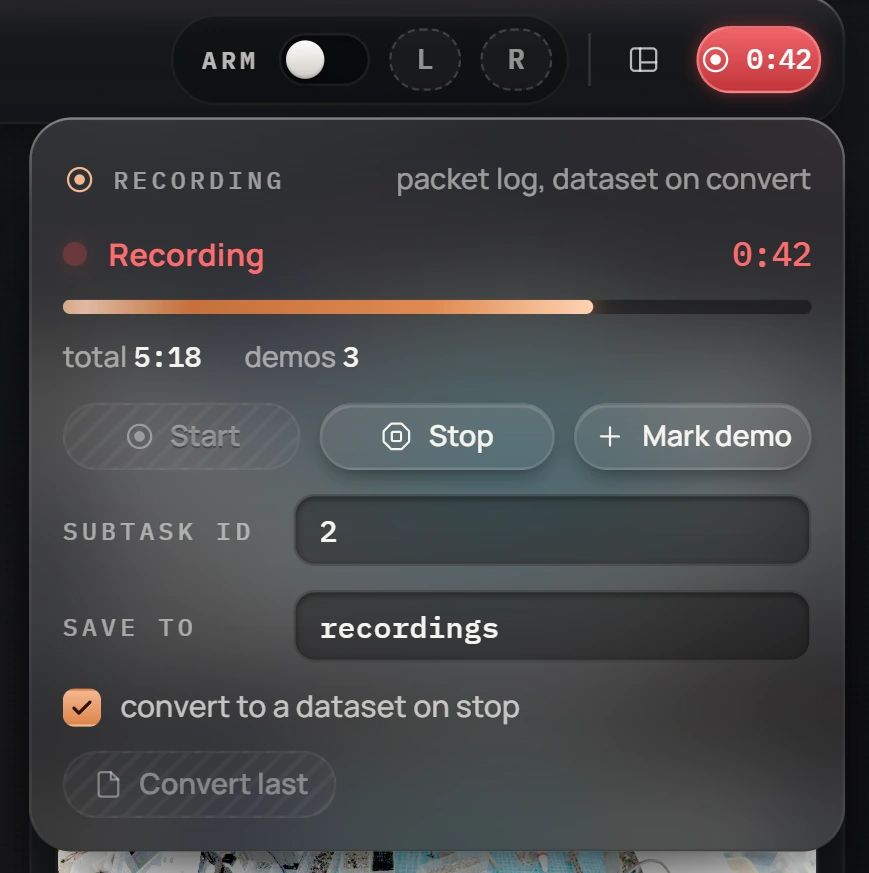
The console's buttons set the same flags your code can set:
robot.recording.start(subtask=2)
robot.recording.mark_demo()
robot.recording.stop()
While recording, the button in the top bar turns red and shows the elapsed time. With convert to a dataset on stop checked, the console converts each recording right after you stop it; Convert last converts the newest one on demand.
The console records with its own recorder process; you do not need to start anything else.
Record from Python
The robot records nothing itself. A recorder process on your PC listens to a copy of the session's traffic and writes it to disk while the recording flag is on. Start one, and tell your session where it listens:
.venv\Scripts\python.exe -m makiina.recorder --out recordingsimport os
os.environ["MAKIINA_TEE_PORT"] = "17999" # before connecting
from makiina.robot import Robot
robot = Robot.connect("head-10")
robot.recording.start(subtask=0) # a session opens on disk
# ... demonstrate ...
robot.recording.mark_demo() # next demonstration
# ... demonstrate ...
robot.recording.stop() # the recorder closes the session
robot.disconnect()The recorder listens on port 17999 by default; MAKIINA_TEE_PORT makes your session send its copy there. Leave the recorder running between recordings; it waits until the flag says record.
Mark what you are doing
The flags you set become the structure of the dataset:
| Call | Effect |
|---|---|
start(subtask=None) | recording on; both arms count as engaged |
mark_demo() | the next frames belong to a new demonstration |
set_subtask(n) | the task label of the frames from now on |
set_trackings([right, left]) | whether each arm is engaged; a span with both off splits episodes |
stop() | recording off; the recorder closes the files |
With a leader and follower rig or scripted teleoperation, drive the same flags from your loop.
Find the files
Each recording is a folder named after the moment it started:
recordings/
  2026-09-29_14-42-17/
    packets.mkrec        every packet of the session, with timestamps
    meta.json            robot model, streams, camera calibration, counts
packets.mkrec is lossless and compact: the video is kept as it arrived, not decoded. It is the master copy; keep it even after you convert.
Turn a recording into a dataset
The converter decodes the video and writes one image per stream and one label file per frame, at a fixed rate:
.venv\Scripts\python.exe ml/dataset_from_session.py recordings/2026-09-29_14-42-17 --out recordings-datasetsrecordings-datasets/2026-09-29_14-42-17/
images/stereo_cam_left/frame_000000.jpg
images/stereo_cam_right/frame_000000.jpg
images/stereo_cam_left_fovea/... images/gripper_cam_left/...
labels/frame_000000.jsonEach label holds the joint positions, the gripper poses, the gripper triggers, the gaze, the engagement flags, the demo counter, the subtask and the time. The converter keeps the frames recorded while the arms were engaged, at 30 per second unless you pass --fps.
The converter lives in the ml/ folder of the repository, so conversion runs from a checkout.
Record someone else's session
A recorder can also capture a session that another program owns, for example an operator teleoperating in VR, without taking the session over. The VR operator app sends its copy of the traffic to port 17999, so a recorder started as above on the operator's PC captures it. Start and stop from Python while they work:
from makiina.recorder import RecorderControl

rec = RecorderControl()         # the recorder on port 17999
rec.start(subtask=0)
rec.mark_demo()
rec.stop()
rec.release()                   # hand control back to the operator's own REC
Use LeRobot
A plugin adapts a MAKIINA robot to the Hugging Face LeRobot Robot interface, for recording LeRobot datasets and running policies. Install it from the root of a checkout:
.venv\Scripts\python.exe -m pip install -e ./lerobot/plugins/lerobot_robot_makiinafrom lerobot_robot_makiina import MakiinaRobot, MakiinaRobotConfig
robot = MakiinaRobot(MakiinaRobotConfig(robot_name="head-10"))
robot.connect()
obs = robot.get_observation() # joints, gripper poses, gaze, images
robot.send_action({"J01-R.pos": 0.1})
robot.disconnect()The image keys follow the robot's streams; restrict them with camera_names.